
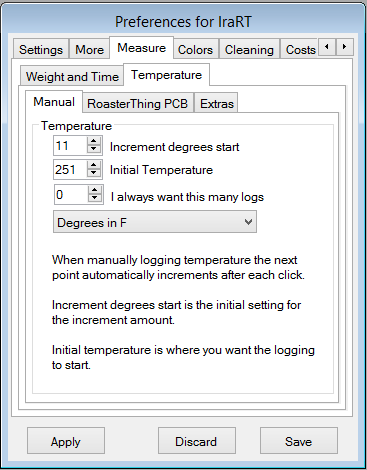
The Measure Temperature tab. If you use the manually enter temperature feature to log roast temperatures this tab lets you set the starting parameters. The way RoasterThing implements temperature logging is to present you with a big button with a temperature displayed on it. When the roast reaches that temperature press the button and RoasterThing will log the time and temperature and automatically adjust the temperature on the button by increment degrees so it's ready for the next point. There are always 2 smaller buttons, one with the last temperature you pressed if the temperature is not moving for a long time and the other with increment degrees below the last temperature for those times when the temperature starts dropping. Increment deegrees start is the number of degrees between each reading. This can be adjusted during the roast. Initial Temperature The first temperature to log. Needs to be slightly higher than ambient. May be adjusted before starting a roast. I always want this many logs If you always log and you set this to the number of thermometers you have, whenever you start a roast this many temperature logging boxes will automatically open.. Degrees in... Do you think in F or C? And then for people using the RT temperature logging board: How Many RT Temperature boards? Set this to the number of RT temperature logging boxes you're using. If you leave this at zero, your RT PCB will not be found. Enable Auto Cool at? If you're using a RT temperature logging box and you check this, RT will press cool for you when the the sum of the slope of both temperature probes is greater than this and you've previously pressed the First Crack Button. Check some of your prior roasts to see what numbers make sense.Currently you may choose between -50 and -450. Show Temperature 2 as: You may display temperature 2 as the actual temperature or as some function combined with temperature 1 or both, in which case the combined version will show up as temperature three. For some roasters where bean temp is not available but you can measure the in and out temperature of air passing through the beans, it's possible that logging the difference may prove useful. I've put in all the choices I can think of that made sense at the time. If I've forgotten one that you think would be useful, please feel free to ask. Legends The graph now puts legends at the bottom right, use this to describe each probe. Maximum Graph Temperature Use this for scaling the graph. Set to 10 or 20 degrees higher than the maximum temperature you normally see.
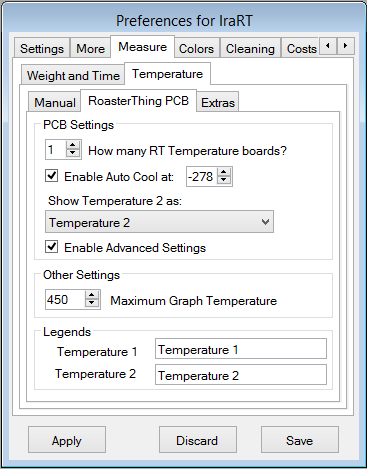
And then if the temperature is not quite tracking perfectly and you think a bit of mathematics will correct the problem you can check "Enable Advanced Settings." Then after you press save and come back to Preferences, this will appear. It should let you make almost any adjustments you might need. And the odds you'll ever need it are probably close to zero. 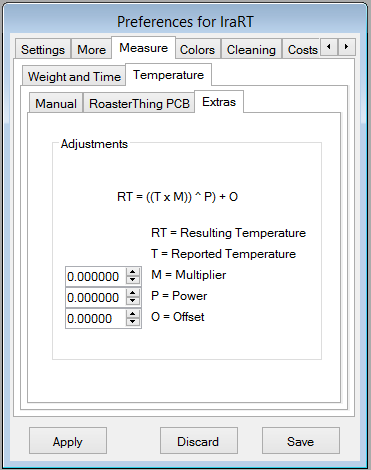
As an example, entering .963 in the power box and and +2 in the offset box should make a type J thermocouple read within a degree or two in the range of 200-500F, plenty close enough for roasting coffee.