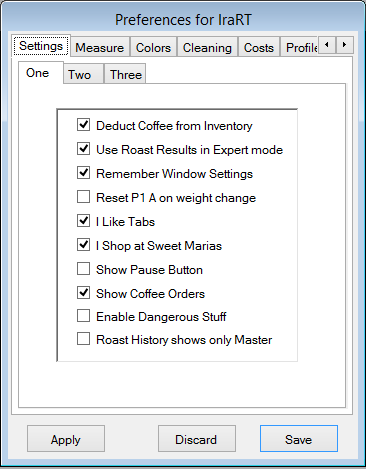
This page contains the following settings: Deduct Coffee From Inventory controls whether Deduct Coffee From Inventory defaults to checked when you save a Roast. Use Roast Results in Expert Mode causes Roast results to always come up in Expert Mode. Expert mode enables modifying some things you will likely never change. Remember Window Settings causes Window setting to be remembered when they are closed. Un-checking this after you've opened and closed all the windows exactly the way you want, preserves those settings. Reset P1 A on weight change makes the software imitate how the Behmor works when you change the weight. I like Tabs will cause a tab line to appear at the top of the RoasterThing window so you can more easily switch between windows. I shop at Sweet Maria's enables the box at program startup alerting you to all the new coffee's at Sweet Maria's and Roastmasters. Show Pause Button enables the Pause button while roasting. Pressing the Pause button stops the clock and pauses the roast. Some users wanted to be able to pause the roast between the end of Preheat and pressing Start again. It's a Behmor thing, probably not useful for anything else. Show Coffee Orders Show the Coffee Orders tab on the coffee detail page. Allows keeping track of multiple purchases of one coffee. Enable Dangerous Stuff Enable the Zero All Coffee Inventory main menu option. I'd suggest not checking this. And even if you Check it, it will become unchecked as soon as you quit RT. Roast History shows only master This will make it so when you open the Roast History you will initially only see Master roasts. Not relevant for most of us, but one of my customers has 30,000 roasts or so in his database and this makes his life easier.