Home
RoasterThing
Software for the modern roaster

Main menu

  • Home
  • Get RoasterThing
  • Owners Manual
  • Mailing List
  • Changes
  • Sharing
  • Links
  • Logging
  • Support

You are here

Home » The manual » Coffee Menu » View Inventory

Manual Contents

  • The manual
    • File Menu
    • Coffee Menu
      • View Inventory
        • Blends
        • Coffee Detail
          • Export To Word
        • Export
        • I Want More
        • Manual Add Roast
        • Statistics
      • Roast History
        • Roast Details
          • Duplicate Roast
          • Print Lables
        • Master Roast
      • Add New Coffee
      • Mass Cupping
      • Brew Coffee
      • Clipboard
      • Find
      • Roast Coffee
        • Manual Add Roast
        • Temperature Logging
        • User Defined Profiles
    • Tables Menu
    • Utilities Menu
      • Preferences
        • Settings
        • More
        • Measure Weight
        • Measure Temperature
        • Graph Colors
        • Logging Colors
        • Cleaning
        • Pricing
        • Profiles
        • Sounds
      • Cleaning
      • Database
      • Forget
      • Notes
    • Window Menu
    • Vendors Menu
      • Sweet Maria's
      • Roastmasters.com

Owners Manual

  • Getting Started
  • File menu
  • Coffee Menu
  • Roast Coffee
    • Temperature Logging
    • User Defined Profiles
    • Manual Add Roast
  • Tables Menu
  • Utilities Menu
  • Window Menu
  • Vendors Menu

Navigation

  • Contact
  • Recent content

Manual Add Roast

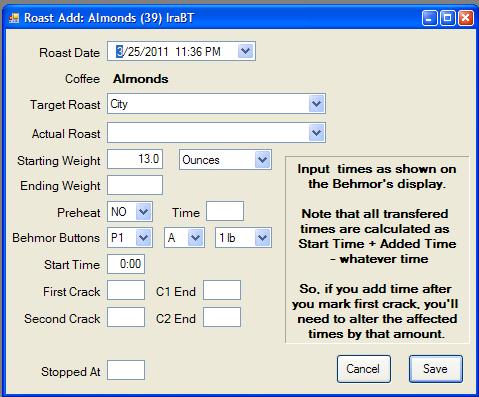
This is for people who occasionally or always roast away from a computer and want an easy way to quickly add a roast that was previously recorded on paper.

‹ User Defined Profiles up Tables Menu ›

Main menu

  • Home
  • Get RoasterThing
  • Owners Manual
  • Mailing List
  • Changes
  • Sharing
  • Links
  • Logging
  • Support