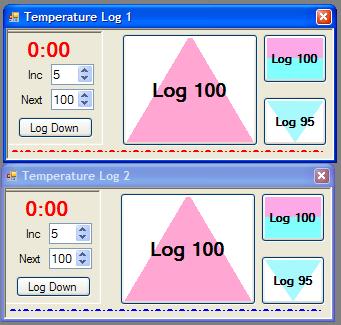
There are two ways to log temperature, manually by clicking a button and automatically by using the RoasterThing Dual Thermocouple Interface board. Manual Logging The manual temperature logging panel allows you to control the logging parameters and easily log a large number of time and temperature points. If you're up for it, you can manually log up to 20 items. The individual panels may be located anywhere you want and have the "Always on top" flag set so they will stay on top of other things so you could log temperature and surf the web at the same time.
Inc controls the automatic advance of the temperatures on the 3 large temperature logging buttons.
Next lets you manually adjust the temperature shown on the three large buttons.
Log Down changes the direction of the increment. It will be obvious as the color and direction of arrows will change ever time you click this.
Whenever you click a large temperature button the indicated temperature is logged and the temperature on all 3 buttons will be adjusted by the Inc amount. The increment will be adjusted in the direction shown by the arrow on the button. Up for red arrows, down for blue arrows and nothing for the flat lined button. Note that I've show these two logging windows stacked, but you can drag them anywhere you want and arrange them any way you like.
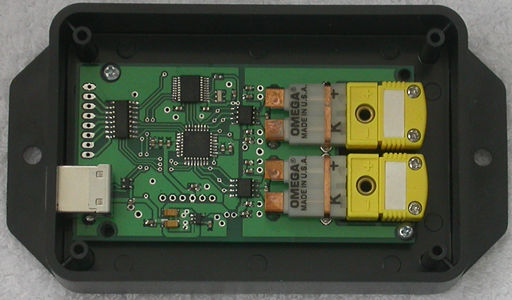
Or you can have RT do it automatically using the RoasterThing Dual Thermocouple Interface board. If the board is plugged in when you choose Roast Coffee or Duplicate Roast, the program will find the board and automatically log temperatures. If you forget and plug it in afterwards, you may choose View=>Start Serial and the program will initialize the board and start logging. If you just want to test the board you may choose. Utilities=>Start Serial and the Serial Interface control box should appear, it may appear minimized in the lower left corner of the RT application. If you accidentally unplug the USB and then plug it back in, you will likely find that it won't work. I've tried to figure out how to make it work, but it seems the drivers have no interest in cooperating.